Posts

Showing posts with the label Ulead VideoStudio

AVCHD to DVD Editing Workflow with Sony Vegas

Image
I am making the transition from mini-DV tape recording to AVCHD recording. I will be abandoning tape recording once and for all and move to memory recording. I say transition because currently my AVCHD recording is on hard disk inside the camera. I prefer memory card recording for maximum convenience, which will arrive soon on my new camcorder. AVCHD recording is the way to go for an Event Videographer who shoots long hours. I have been shooting 2-hour long seminars for the past two months and edited them to DVDs successfully. The editing is done on Sony Vegas Pro 8 and converted to DVD-compliant MPEG2 files. Here is the AVCHD workflow with DVD as the final product: Connect AVCHD camcorder (hard disk type) to PC via USB cable. Transfer AVCHD videos (.MTS files) to PC hard drive. Open Sony Vegas Pro 8. Drag and drop MTS files into Sony Vegas timeline. Edit. Add titles, cut scenes, add music, adjust sound quality, etc. Render project as DVD-compliant MPEG2 files...

Breakthrough! Create a 30-second Video Ad in Half an Hour...

The objective was to promote a website. To generate traffic to http://easycashsystemnow.com/ . Text and graphic content were all from the website. Here's the whole process done in half an hour. Use Corel VideoStudio . Copy and paste the headlines and sub-headlines. Copy and paste the ebook 3D cover graphic. Copy and paste 5 points from the list of benefits. Copy and paste the call-to-action texts for the last scene. Re-arrange and resize texts. Use black and white for simplicity. Select and add a catchy music track. VideoStudio comes with some automatic music that resize itself to fit the duration of the video. Select and add sound effects of a crowd cheering in the background. Animate the texts. Animate the ebook cover graphic. Fine tune the overall video so that the music beat syncs with the visuals. Render to WMV in high resolution. Finally the video clip was uploaded to 30 over video-sharing, social and bookmarking sites using Traffic Geyser . Writing this blog article took lo...

To Choose DV Video Encoder Type 1 or 2 ?

Image
DV Video Encoder Type 1 OR Type 2 When it comes to rendering video to DV format, sometimes we face a delimma of choosing between DV Video Encoder Type 1 and DV Video Encoder Type 2. Here’s a quick answer for video makers using miniDV tape format. Choose DV Video Encoder Type 2. If you want to know why, read the following explanation taken from microsoft site. DV Video Encoder Type-1 Method The native DV interleaved stream that is produced and consumed in I/O with a DV device contains DV compressed video and pulse code modulated (PCM) audio data. This single interleaved stream can be stored in an AVI file as “ivas” stream (for interleaved video/audio stream). Microsoft refers to this format as a type-1 DV AVI file. Because the type-1format stores data as a single AVI stream, type-1 DV AVI files are not compatible with VfW. DirectShow, however, easily handles type-1 data streams by routing the streams to a DV Splitter filter that produces ...

How To Convert Video File To PAL DV Format

Image
Convert Any Video File To PAL DV How To Convert Any Video File To PAL DV format using Ulead VideoStudio 11. Do you want to record a video file onto your camcorder but it says your video is NTSC and cannot be done? In Singapore and in most European countries, our TV operate on the PAL system. In the USA and Japan, thier TV operate on the NTSC system. NTSC and PAL are not compatible. So you will have to convert your NTSC video file to a PAL DV format file. Here is how to convert your NTSC Video File To PAL DV format using Ulead VideoStudio 11. Drag and drop video clip on the time line. Click “Share” from the top menu bar. Click “Create Video File” . Move and hover cursor over “DV”. Depending on how your VideoStudio was installed… You may see PAL DV (4:3) and PAL DV (16:9) Or you may see NTSC DV (4:3) and NTSC DV (16:9) If you see PAL DV (4:3) and PAL DV (16:9), great, click on one of them. If you see NTSC DV (4:3) and NTSC DV (16:9), then do ...

My Crumpled Ticket To Singapore NDP 2008...

Image
NDP08 Experience Edited to 6 minutes… August 11th, 2008 YES! I got the ticket to Singapore National Day Parade 2008 at the last minute. It was a Videography assignment to record a group of foreign delegates invited to watch. Simply edited with Ulead VideoStudio 11, here is my best experience in NDP08 in 6 minutes… The crumpled NDP 2008 ticket from my soaking wet crowded pants pocket… ...it rained! Can you spot the NDP 2008 ticket on my wall of collectibles? Adrian Lee Blog - http://Adrian.VideoLane.net Products - http://VideoLANE.net Service - http://VideoLane.com

Reverse Video in VideoStudio 11

Editing Reverse Video Effect in VideoStudio 11 - Tutorial Want to make your video play backwards? How to reverse video using VideoStudio 11? Here is how to reverse video in Corel Ulead Video Studio 11 Plus. Click here to watch video...

Slow Motion Effect in VideoStudio 11

Editing Slow Motion Special Effect - VideoStudio 11 Tutorial Want to change the playback speed of your video? How to edit slow motion effect on your video? Slow motion effect is great to emphasize a movement. Here is how to edit a slow motion effect with Corel VideoStudio 11. Click here to watch video...

Ulead VideoStudio 11 Plus Tutorial : Adjusting Volume Level

Image
Adjusting Audio Level in Ulead VideoStudio 11 - Tutorial There are two methods to adjust audio level in Ulead VideoStudio 11. Below are the step by step tutorials for the two methods. Method One: Using Clip Volume Control Adjusting audio level with Clip Volume Control changes the volume of the entire clip at once. Select a clip in the timeline by clicking on it. Select Clip Volume control in the Options panel. Adjust the Clip Volume control upwards for louder sound. Adjust the Clip Volume control downwards for softer sound. Minimum is 0% which is silent and the maximum is 500%. The original level is 100%. Method Two: Using Volume Rubber Band Adjusting audio level with Volume Rubber Band allows you to change the volume in any part of the clip. Click Audio View. You can now see the audio waveform in the timeline. Click on the video clip which you want the audio adjusted. The volume rubber band is the red horizontal line in the middl...

Build An Instant Movie in 6 Easy Steps

Image
Build-A-Video Workshop, Where Instant Movies Are Made My 10 year old daughter celebrated her birthday over the Easter weekend. What she wanted was a stuffed animal from Build-A-Bear Workshop. Being ignorant of kids stores around town, I thought Build-A-Bear Workshop was just another toy shop. By co-incidence while reading the financial news about Bear Stearns, I discovered Build-A-Bear Workshop is listed on New York Stock Exchange at a whopping $9 per share (rounded off). I thought: “How can a teddy bear shop make so much money?”. I brought my daughter to a nearby outlet to find out… and to build her the bear. The store was buzzing. There were mainly 3 types of customers. Parents buying for kids. Boyfriends buying for girlfriends. Girls buying for themselves. The staff were cheery bubbly teen girls bouncing around the store like they will never run out of batteries. Dollar signs appeared in front of my eyes. It is a novelty store. You actually...

Blu Ray Is In, HD DVD is Dead!

Image
The battle is finally over. No need to decide whether to produce Blu-ray or HD DVD Discs. The winner is Blu-ray ! "Sony and its Blu-ray buddies are going to make like VHS and party like it's 1989." Here are the news. Read all about it... HD-DVD Death Made Official - Wired Toshiba Quits HD Format War Blu ray The Winner - Smart House News Toshiba to Give Up on HD DVD - TheStreet.com R.I.P. HD DVD: Toshiba reportedly ends the war - CNET Toshiba to exit HD DVD, end format war - Reuters Toshiba finishing format war, pulling plug on HD-DVD - XboxNowOnline Game Over For HD DVD; Toshiba To Cease Production of HD DVD - Gaming Bits Blu-ray wins HD DVD format wars as Toshiba exits market! - VideoGamesBlogger Toshiba pulling HD DVD support, Blu-ray has won the war - Gadgetell Toshiba to Withdraw HD DVD Format -Techtree Microsoft Planning Blu-ray For Xbox 360, Following Fall of HD DVD - dBTechno Toshiba To Halt HD-DVD Production - Slashdot Has Blu-ray won? HD-DV...

How to Edit a DVD Video Intro and Where to Get Royalty-Free Music...

Image
"I WANT MY INTRO" My client demanded an intro to be added to their seminar dvd video product. I have really spoilt my clients by giving them excellent stuff. So when I decided not to edit the intro video sequence but do a static title opening, they were not happy. (pssst.. I did that coz I was in a hurry to complete loads of projects 1 day before my London trip) "GIVE THEM THE USUAL FORMAT" My colleagues told me to use my usual format to save time. Huh? What usual format? To me, every seminar I shoot is different. Unique in its own way. Every seminar has its own theme. I have to CREATE something special. I hate to say it, but sometimes I do too much and charge too little. Passion for my work? WHO IS PRESENTING? That was the first question that crossed my mind. This is an "Internet Millionaire" training seminar conducted by Matt Bacak. I usually check the speaker's website to get the idea of who he is and what's his corporate theme. Then I will grab...

HD Video Editing Software With World’s First DVD Editing and Authoring Certification for Both BDMV and AVCHD Formats...

Image
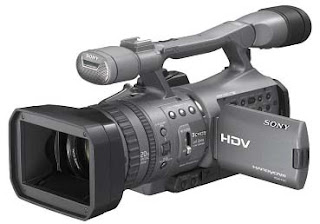
Ever since I own the Sony HDR-FX7 High Definition Camcorder, I have been using it to shoot projects only at standard definition (SD) more than 90% of the time. That's because my video assignments are mostly events and seminars which require the final video to be produced in normal DVD format. The HD mode is turned on when the camcorder is used for the production of corporate videos and TVCs where High Definition meets TV broadcast standards. The big question is... what about creating High Definition DVDs? Which software can I use to capture, edit, author and burn my High Definition Video onto HD DVD or Blu-ray? Here's the good news... Ulead VideoStudio 11 received the World’s First DVD Editing and Authoring Certification for Both BDMV (Blu-ray Disc Movie Video) and AVCHD (Advanced Video Codec High Definition Standard) Formats. For years I have been using and recommending Ulead VideoStudio for simple DVD video projects. Now with the HD certification, I am going to recommend it...