Posts

Showing posts with the label video editing

Successfully Trained Another Batch of Basic Videography Course Students.

Image
Look at the video they have created in just 2 days... For 2 days I was tied up in the studio with 7 interested learners. They were a mix of working adults and one polytechnic student. This is one of the best lessons I have conducted. The participants were so full of energy and ideas. The video above was mostly their creative input working as a team. I was only just the actor and content writer while they did the rest. Day one was about using the camcorder and Day 2 the technique of video editing. More than technical skills, there was also the art of creating compelling videos. Video making skill is a requirement in most work places today, Like knowing how to use the computer, one must know how to make a video. I am now scheduling the next 2-day Basic Videography Course next month. You can see the announcement at http://videolane.com/courses/basic-videography . Adrian Lee http://VideoLane.com  PS: Do you foresee video making skill becoming an essential requi...

How to Use Windows Movie Maker Software - Video Tutorial for XP

Image
Image via Wikipedia Here's a free video tutorial on how to use Windows Movie Maker on the XP. If you already have Vista, please go here. This video tutorial is for beginners, totally basic, and a great way to understand the step-by-step workings of Windows Movie Maker. To learn faster, please pause the video at every step and do the step on your own Windows Movie Maker. Taking action and experiencing first hand is the best way of learning. Thanks to AnasiraProductions for making this video tutorial. If you have further questions, please type your questions with the comment link below. Adrian Lee http://VideoLane.com Video On The Move... Related articles by Zemanta Windows 7 to Skip Photo, Mail, Calendar and Movie Editing tools (techpluto.com) Right cable can work with old camcorder (seattletimes.nwsource.com) Portable Windows Movie Maker Resurrects Missing Features [Downloads] (lifehacker.com) Windows Live Movie Maker Due Later This Year. Top Feature Request: Windows XP Su...

How to Use Windows Movie Maker - Tutorial for Vista!

A friend wanted me show him how to edit a simple yet decent video with a free software. Did you know that all PCs with Windows Vista come with a free video editing software? It's called Windows Movie Maker! Vista even comes with a free DVD Maker! You don't need to hire expensive videographers like me to edit your videos anymore. I am about to show you how to edit videos yourself on your own PC EASILY! Please take your time to watch this video made by "czh88". AND PRACTISE hands-on... Pause the video on every step and do the step. Enjoy! Not good enough? Here's another by "cccccarlossss"... Ok ok, here is a full 30-minute tutorial by "diddyman4real"... If you are still puzzled how to edit a video for free, ask me... leave your question in the comment box below... maybe I will create a better tutorial. Adrian Lee http://VideoLane.com

4 Steps to Video Editing On-the-Fly

Image
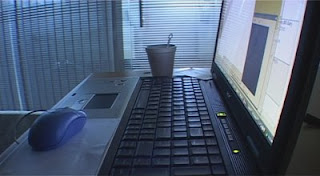
This is a picture of my old but trusty video editing Acer laptop. Though it has Sony Vegas Pro 8, I am using Vegas 4 for speedier delivery. I am in a little dark corner of a room with a cup of hot tea, editing the video of a training workshop which is going on right now. Video editing on the fly is required when client wants to watch the video at the end of the day. Here are 4 steps to produce a video quickly: Plan the video sequence: Study the event program. Rearrange the sequence to form an interesting storyline. Start and end with a bang. Leave the light moments in between. Draw a flow chart on paper. Shoot for edit: With the video sequence flow chart on hand, shoot the video exactly how you want the shot to appear. Take extra footages for more choice. Cover at least 3 main shots: wide, mid and close-up. Edit ruthlessly: Editing takes up the most time. Select your best shots quickly and cut away the rest. Pre-layout the video sequence using text clips. Slot in the visuals whe...

Convert and Play JVC ".TOD" video Files?

Image
Do you have trouble playing the ".tod" video files from your JVC camcorder? My friend did.   So here are the answers to the 6 most frequently asked questions about JVC TOD video files. http://videolane.com/2009/03/how-to-convert-and-play-tod-video-files/ The 6 TOD questions: What are TOD video files? How to play TOD video files on a PC? How to convert a TOD file to an MPG file? What software can edit a TOD video file? How to convert TOD files to a playable DVD? How to convert TOD files to AVI, WMV, MOV, MP4 and more? See the answers... http://videolane.com/2009/03/how-to-convert-and-play-tod-video-files/ Enjoy! Adrian Lee http://videolane.com

Free Video Editing Software for Download

Image
If you are just a beginner in video editing, you may be confused by the wide range of video editing software in the market today. Some software packages cost more than $500 while others are below $100, and yet some are free! There are many free video editing software for download. Here are the top seven that we have found... http://videolane.com/2009/03/7-free-video-editing-software-to-download/

Online Videography Course

Image
Making videos is becoming part of everyone’s life today. You shoot videos with your phone, webcam and your photo camera. You edit videos easily on your computer for fun and for work. Would you like make better videos to impress your audience? I have developed an online videography course to help you make a good video. http://videolane.net/VideographyCourse This is the same version of the course I teach live at my studio… minus the hands-on interactive guidance. Learn Videography in 5 Days… Know How to Make a Good Video! In this online videography course, you will learn: How to Choose the Right Video Camera and Learn Professional Video Camera Skills. Includes Sound and Lighting Techniques. What is the Best Video Editing Computer and Software. Learn Video Editing Techniques that Produce Compelling Videos Like a Pro. How to Author, Burn, Print, Package and Duplicate DVDs. Putting it all together. Learn everything you need know to create a professional-looking DVD. Get instant acc...

Event Pan/Crop Window Too Small… Sony Vegas Pro 8 Tutorial

Image
Here’s a sticky problem I get asked frequently by new Sony Vegas users. You may encounter it sometimes. Is your Event Pan/Crop window stuck in a tiny area with the rest of the Sony Vegas Windows? Do you want to make the Event Pan/Crop window bigger or open it in a new window? (You cannot do much with Pan/Crop effect in such a tight space.) Here’s how to get it out…

Flip a Video with Sony Vegas Pro 8 - Tutorial

Image
In most video editing software, like windows movie maker, there is an effect where you can flip the video horizontally or vertically. This video effect option is either called the “Mirror” or “Flip”. However, in Sony Vegas, this effect is not as straight forward as clicking a button. Here is how to flip a video with Sony Vegas Pro 8...

Extracting Videos From a DVD to MPG

Image
Do you want to edit a DVD or maybe take out a part of the DVD to be edited with other video footages? Do you know that you do not need to buy any software to extract video clips from a DVD? You can even do it yourself. All you need is your PC with a DVD drive. In this video tutorial, you will learn how to extract video from a DVD using a PC running on Windows XP. Steps to extract videos from a DVD... How to Extract Video from a DVD for Editing

To Choose DV Video Encoder Type 1 or 2 ?

Image
DV Video Encoder Type 1 OR Type 2 When it comes to rendering video to DV format, sometimes we face a delimma of choosing between DV Video Encoder Type 1 and DV Video Encoder Type 2. Here’s a quick answer for video makers using miniDV tape format. Choose DV Video Encoder Type 2. If you want to know why, read the following explanation taken from microsoft site. DV Video Encoder Type-1 Method The native DV interleaved stream that is produced and consumed in I/O with a DV device contains DV compressed video and pulse code modulated (PCM) audio data. This single interleaved stream can be stored in an AVI file as “ivas” stream (for interleaved video/audio stream). Microsoft refers to this format as a type-1 DV AVI file. Because the type-1format stores data as a single AVI stream, type-1 DV AVI files are not compatible with VfW. DirectShow, however, easily handles type-1 data streams by routing the streams to a DV Splitter filter that produces ...

My Crumpled Ticket To Singapore NDP 2008...

Image
NDP08 Experience Edited to 6 minutes… August 11th, 2008 YES! I got the ticket to Singapore National Day Parade 2008 at the last minute. It was a Videography assignment to record a group of foreign delegates invited to watch. Simply edited with Ulead VideoStudio 11, here is my best experience in NDP08 in 6 minutes… The crumpled NDP 2008 ticket from my soaking wet crowded pants pocket… ...it rained! Can you spot the NDP 2008 ticket on my wall of collectibles? Adrian Lee Blog - http://Adrian.VideoLane.net Products - http://VideoLANE.net Service - http://VideoLane.com

How to Achieve Natural Perfect Eyesight...

Image
What if we, especially videographers, have a vision of an eagle . The ablity to see details from afar. This eye improvement method is possible… I attended an eye-opening educational forum on lasik surgery last night. LASIK is about using tiny laser beams to correct poor eyesight. It claims the ability to bring eyes back to zero degrees, in other words, perfect eyesight. Going further, an enhanced laser surgery can even make your eyes see further than any human beings can. They call it the Eagle Eye vision which famous golfer Tiger Woods did. Hmmm… I was thinking what if videographers get eagle eye vision, wouldn’t that be perfect? We will be able to see and shoot things that others cannot see. The surgery is rather pricey though, like $2000 and over. It can help in the 3 most common poor eyesight problems: Short-sightedness : which happen to those who study very hard and those who do video editing everyday or rather work in front of the computer always. Can see near b...

Sony Vegas Pro 8 Tutorial - Missing Keyframe In Text Generator

Image
Missing Keyframe In Text Generator - Sony Vegas Pro 8 Tutorial Missing keyframe control panel in your text generator? It was there yesterday and now it is gone? Want to know how to set it back and turn it on again? Very easy. Here is how to turn back on the keyframe control panel in the text generator of Sony Vegas Pro 8. Watch Video Here...

Reverse Video in VideoStudio 11

Editing Reverse Video Effect in VideoStudio 11 - Tutorial Want to make your video play backwards? How to reverse video using VideoStudio 11? Here is how to reverse video in Corel Ulead Video Studio 11 Plus. Click here to watch video...

Slow Motion Effect in VideoStudio 11

Editing Slow Motion Special Effect - VideoStudio 11 Tutorial Want to change the playback speed of your video? How to edit slow motion effect on your video? Slow motion effect is great to emphasize a movement. Here is how to edit a slow motion effect with Corel VideoStudio 11. Click here to watch video...

Mac to PC Font Converter

Image
How to Convert Mac Fonts to PC Fonts Free? I stayed up till 2 am last night googling for a free mac to pc font converter software. You may think I am such a cheapskate when I can just buy one from $50. That’s right, mac to pc font converter softwares are not cheap. I never needed to convert mac fonts to pc fonts since I started video production 10 years ago. Not till the latest project where the corporate fonts were given to me in mac format. PCs cannot read nor install mac fonts. You have to convert them to PC format fonts first. You can either convert them on the mac then bring them over to the PC or you can convert the mac fonts directly on the PC. In any case, that means when looking for a mac to pc font converter software, you have to take note of its operating system requirement. Since I do not have macs, I looked for a mac to pc font converter that runs on a Windows PC. Based on my google research, there were many free font converters in the pa...

Is WD 250GB Portable Hard Drive good?

Image
Video Production With WD 250GB External Hard Drive - Review Purchased a Western Digital WD 250GB Portable Hard Drive. S$199 from Challenger Tiong Bahru. There were two models on the shelves. One with backup software (Elite) and one without (Essential). I chose the model without backup software, cheaper of course. They call it “My Passport Essential”. Passport? The drive does look a bit like a passport, we can even choose colors. Blue or red. I chose blue. Wanted black but there was no stock. Then there were three specifications to choose from. 160GB, 250GB and 320GB. I have many 160GB drives, so the next thing to try is 250GB. I needed only 100GB actually. The last minute decision to get this hard drive is for a video production project that was shot with 3 camcorders. That’s 18 hours of video footage. One hour of video in PAL DV format takes up 12GB of hard drive space. The video production project requires immediate and dedicated attention for delivery within one wee...

Voted Best Again at Yahoo Answers

How to Resize Video for Rendering - Sony Vegas Pro 8 Tutorial Yay! Voted best answer again at Yahoo Answers. A question was asked on how to resize a WMV V9 format video for rendering using Sony Vegas Pro 8. Here is my quick answer… Resizing video for rendering to WMV V9 format. 1. Select “Render As” 2. Select “Save as type:” > “Windows Media Video V9 (*.wmv)” 3. Click button “Custom…” 4. Click tab “Video” 5. Select “Image size:” > “(Custom)” 6. Change Width and Height to desired size. 7. Click “OK” Enjoy! Adrian Lee Blog - http://Adrian.VideoLane.net Product - http://InstantViralVideo.com Service - http://VideoLane.com

The Best of Being a Singapore Videographer

Image
Singapore Videographer Gains Weight Filming Company Retreat Literally! My tummy grew bigger, pants became tighter. That’s after two weeks on the job. This is the best part of being a Singapore Videographer on a filming assignment for a company retreat. Tea breaks, lunches and dinners! I was trapped in a 5-star hotel on an island resort. There was no where to go, but to eat what the participants ate. Good FOOD! Everyday a new menu. Many dishes I have never even heard of. I like to start with deserts. Plenty of chocolate mousse and creamy pastries. For dinner, there were wines and beers. I am not a good drinker, but it certainly was a good treat. Being well-fed on the job has its reasons. My task was to video the two-week company retreat and produce a 5-minute clip on the very last day. The filming was easy. I just needed to know the program and follow accordingly. It was the video editing that takes takes a lot of effort. I have to deci...